Focus Distance Recording

This update adds focus distance to the data you can record for each frame, giving you a more complete picture of your shooting settings. The update also includes several interface improvements that make entering and reviewing your frame data more convenient.

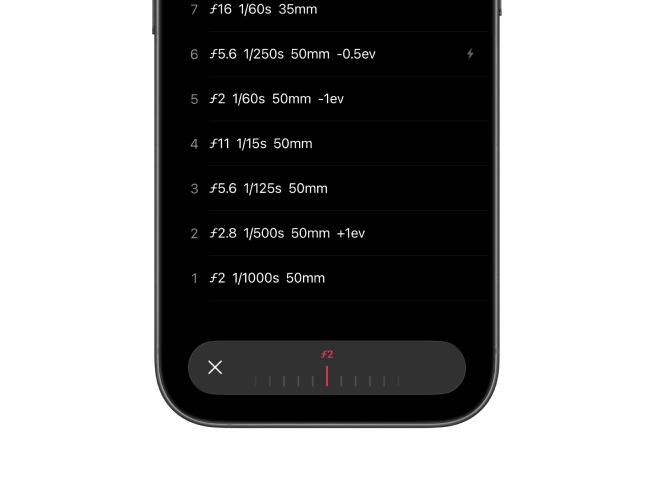
Frames app showing focus distance recording for a frame

Track Your Focus Distance

When logging a frame, you can now record the focus distance alongside your other shooting data. Whether you were focused at 1.2 meters for a portrait or set to infinity for a landscape, this information is saved with each shot. The app reads your iOS regional settings and displays distances in meters or feet accordingly.

If you use Frames on Mac, this focus distance data can be written into the Subject Distance and Subject Distance Range fields of your EXIF metadata when exporting to DNG, JPG, or TIFF. Your focus settings stay with your scans, just like aperture and shutter speed.

Interface Improvements

Selecting focal length values is now easier, and the exposure compensation picker shows 0 EV instead of Not Set when no adjustment is recorded. Parameters also appear in a consistent order across the frame list and settings, making the app more predictable to use.

Improvements (6)

  • Record focus distance for each frame with automatic unit selection based on iOS settings
  • Easier selection when entering focal length values
  • Exposure compensation picker now shows 0 EV instead of Not Set
  • Consistent parameter order across the frame list and settings
  • Various interface improvements
  • Switch films from the recent list while the recorder stays open and updates automatically

Fixes (1)

  • Focus Distance: Fix a bug where focus distances recorded in feet were saved as meters instead of converted.

Patches (2)

  • 1.21.1: Minor UI Improvements
  • 1.21.2: Switch films faster, fixed focus distance bug

Localized Welcome Screen and Exposure Metadata

The welcome screen has been localized and refined for all supported languages. Previously available only in English, it now displays in your preferred language with clearer drag and drop guidance to help you get started.

Frames macOS app showing Exposure Mode and Exposure Program in the sidebar

Exposure Mode and Exposure Program

Exposure Mode and Exposure Program are now visible directly in the sidebar, making it easier to review this information while browsing your images. Exposure Mode displays as either Manual or Auto Exposure, while Exposure Program shows Manual, Aperture Priority, Shutter Priority, or Normal Program based on your recorded data.

These fields have also been reintegrated into the EXIF metadata when exporting to DNG, JPG, and TIFF files, so your exposure settings travel with your scans.

Improvements (4)

  • Welcome screen now localized in all supported languages with improved drag and drop guidance
  • Exposure Mode and Exposure Program displayed in sidebar
  • Exposure Mode and Exposure Program written to EXIF metadata for DNG, JPG, and TIFF
  • Visual and interaction refinements across the interface

Patches (1)

  • 1.12.1: Minor UI improvements

Film Sorting & Quick Access

This update gives you more control over how your library is organized and makes it faster to get where you need to go. Films inside folders now have sorting and ordering options, and a new Recent Films shortcut lets you jump between projects without leaving your current screen. You can also long-press rows to access common actions right where you are, and there's a new Auto option for recording exposure settings.

Frames film photography app film sorting and quick access features

Sort and Order Your Films

You now have full control over how films are organized inside your folders. Sort your rolls by name, date created, or date edited, and choose ascending or descending order. If you group films by project, trip, or camera, this makes it much easier to find what you're looking for without scrolling through everything.

Jump to Recent Films

A new Recent Films shortcut is now available inside every film menu. This lets you quickly switch to another roll you were working on recently without navigating back to the library first. It's a small addition, but it saves time when you're moving between active projects.

Long-Press for Quick Actions

Long-pressing any row now reveals a menu of shortcuts for that item. Whether you want to move, edit, or delete something, the options are right there where you need them. This works throughout the app and reduces the number of taps required to get things done.

Auto Option for Exposure Settings

When recording frames, you can now select Auto for shutter speed and aperture. This is useful when you're shooting with a camera that handles exposure automatically and you just want to log the shot without entering specific values. The option sits alongside your existing manual choices in the recorder toolbar.

Location and Privacy Updates

If you have location services turned off, you can now set locations manually without any restrictions. The app no longer requires GPS access to let you select a location. There's also a redesigned Privacy Settings screen that gives you a clearer view of how your data is handled, along with direct access to the Privacy Policy.

Improvements (10)

  • New sorting and ordering options inside folders
  • Recent Films shortcut available in every film menu
  • Long-press any row to access contextual actions
  • New Auto option for shutter speed and aperture in the recorder
  • Set locations manually when location services are disabled
  • Redesigned Privacy Settings screen with direct access to the Privacy Policy
  • Interface refinements and improved animations
  • Translation updates across all supported languages
  • Added icons to the export menu to make finding formats easier
  • Localized camera permission descriptions to match device language

Fixes (2)

  • Film creation: Fixed a bug that prevented adding films on a fresh app installation.
  • Frame picker ordering: Fixed an issue where frame numbers appeared out of order in the form picker.

Patches (3)

  • 1.20.1: Fixed adding films on fresh installations
  • 1.20.2: Auto exposure option, Privacy Policy access, and UI refinements
  • 1.20.3: Clearer export options, fixed picker ordering, and improved localization

Folder Exports & Faster Film Creation

This update focuses on getting your data out of the app more easily and saving you time when starting new rolls. You can now export entire folders at once, and the app remembers your last settings so you spend less time on setup. The search interface has also been cleaned up, and there are new film stocks to choose from.

Frames film photography app folder export and faster film creation

Export Entire Folders

When you export a folder, everything inside comes with it. All your film rolls, any subfolders, and their contents are included in a single export. This makes it much easier to back up or share an entire project or trip without having to export each roll separately.

Start New Rolls Faster

Creating a new film now takes a lot less effort. The app automatically fills in your camera, lens, filter, film stock, and ISO based on what you used last time. If you tend to shoot the same setup for a while, you can jump straight to recording without re-entering everything. Of course, you can still change any of these settings before you start.

Cleaner Search Layout

The search interface has been refined for better clarity. Results are easier to scan, and the overall presentation is cleaner. These are small changes, but they make a difference when you're looking through a large library.

More Film Stocks

The film stock database continues to grow. This update adds new options from Cinestill, Adox, Kodak, and Orwo. Whether you're shooting a classic emulsion or trying something new, there's a good chance it's already in the list.

Improvements (7)

  • Export folders with all film rolls and subfolders included
  • Camera, lens, filter, film stock, and ISO are now autofilled from your last film
  • Refined search layout and presentation for better readability
  • Subtle interface and animation improvements throughout the app
  • Added new film stocks from Cinestill, Adox, Kodak, and Orwo
  • Coordinates are always saved when GPS is available, and location names are resolved online later
  • Map search now prioritizes nearby places for more relevant results

Patches (1)

  • 1.19.1: Location & map improvements

Library, Search & Settings Improvements

This update brings powerful new ways to browse and search your library. Films are now grouped by date for easier navigation, and you can filter searches by stock or camera. The Settings screen has also been completely redesigned.

Frames film photography app library and search settings improved

Browse Your History by Date

Finding a specific roll in a large library just got much easier. Films are now intuitively grouped by date, letting you quickly navigate through your shooting history. Whether you're looking for last week's shots or something from months ago, the timeline-based organization helps you get there faster.

More Powerful Search

Search now goes beyond film names. You can filter your library by film stock or camera, making it easy to find all the rolls you shot on a particular emulsion or with a specific body. As you start typing, suggestions appear to help you find what you're looking for even faster.

A Snappier Recorder

The recorder is now more responsive, with smoother animations for a snappier recording experience. Previously, older devices running iOS 17 and iOS 18 could experience some lag, that's now a thing of the past.

Redesigned Settings

The Settings screen has been completely overhauled with a cleaner, more modern design. Everything is easier to find and navigate, giving you quick access to all the options you need to customize your Frames experience.

Improvements (8)

  • Films are now grouped by date for easier library navigation
  • Search filters for film stock and camera in addition to name
  • Search suggestions when starting a new search
  • Snappier recorder with smoother animations on iOS 17 and iOS 18
  • Completely redesigned Settings screen
  • Improved deletion confirmation dialogs to prevent accidental removals
  • Refined toolbar colors for Light Mode on iOS 17 and iOS 18
  • Minor translation refinements across all supported languages

Fixes (2)

  • Frame date saving: Fixed an issue where frame date changes were not saving correctly.
  • Custom sequences delay: Fixed a delay where custom aperture and shutter speed sequences would take several minutes to appear on the toolbar.