JPEG XL Support & Metadata Export

This update adds support for JPEG XL to the Mac app. You can now embed your capture data directly into .jxl files when exporting scans, alongside JPEG, TIFF, and DNG. The release also includes minor UI improvements.

Frames macOS app exporting metadata to JPEG XL

JPEG XL & Metadata

Frames for Mac now supports JPEG XL. When exporting your scans, you can embed data captured via the iPhone app directly into .jxl files, just as you can with JPEG, TIFF, and DNG. This ensures your images remain fully documented across modern file formats while keeping your film photography workflow consistent.

Embedded metadata includes image number, date and time, GPS coordinates, aperture, shutter speed, exposure program, exposure mode, exposure compensation, flash, metering mode, focal length, focus distance, subject distance range, lens make and model, lens serial number, lens specification, camera make and model, camera serial number, ISO speed rating, sensitivity type, and additional notes such as film stock, filters, and personal remarks.

Improvements (3)

  • Support for JPEG XL (.jxl) with embedded metadata on export
  • Capture data now writes consistently across JPEG, TIFF, DNG, and JXL formats
  • Minor UI improvements

Focus Distance in Sidebar and EXIF

This update brings focus distance support to the Mac app. If you record focus distance in Frames for iOS, that data now appears in the sidebar and gets written into the EXIF metadata when you export your scans. The update also improves how certain metadata values are handled and includes visual refinements for macOS Sequoia.

Frames macOS app showing focus distance in the sidebar

Focus Distance and Subject Distance Range

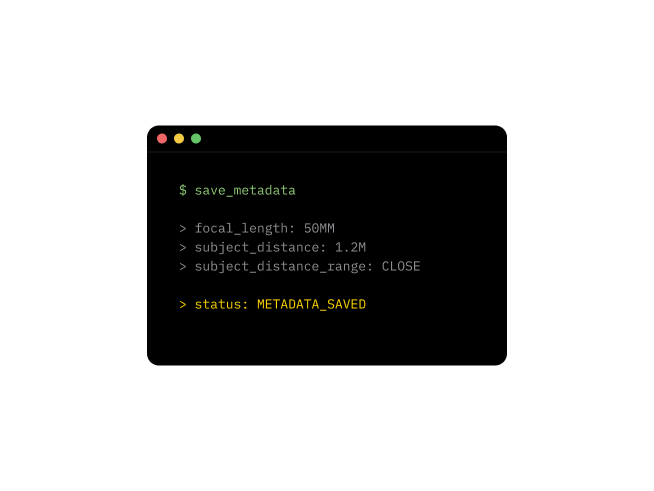
Focus distance is now visible in the sidebar alongside your other shooting data. When you export to DNG, JPG, or TIFF, this value is written to the Subject Distance field in the EXIF metadata. The app also calculates a Subject Distance Range by combining the focus distance with the focal length you used for the frame, giving image viewers and cataloging software more context about your shot.

This feature works with focus distance data recorded in Frames for iOS (version 1.21.0 and later). If you've been logging focus distance on your phone, that information now carries through to your exported files on Mac.

Improvements (6)

  • Focus distance displayed in sidebar
  • Subject Distance written to EXIF metadata for DNG, JPG, and TIFF exports
  • Subject Distance Range calculated from focus distance and focal length
  • Flash Off now written to metadata instead of being skipped
  • 0 EV exposure bias now written to metadata instead of being skipped
  • Visual refinements for macOS Sequoia, including sidebar appearance

Focus Distance Recording

This update adds focus distance to the data you can record for each frame, giving you a more complete picture of your shooting settings. The update also includes several interface improvements that make entering and reviewing your frame data more convenient.

Frames app showing focus distance recording for a frame

Track Your Focus Distance

When logging a frame, you can now record the focus distance alongside your other shooting data. Whether you were focused at 1.2 meters for a portrait or set to infinity for a landscape, this information is saved with each shot. The app reads your iOS regional settings and displays distances in meters or feet accordingly.

If you use Frames on Mac, this focus distance data can be written into the Subject Distance and Subject Distance Range fields of your EXIF metadata when exporting to DNG, JPG, or TIFF. Your focus settings stay with your scans, just like aperture and shutter speed.

Interface Improvements

Selecting focal length values is now easier, and the exposure compensation picker shows 0 EV instead of Not Set when no adjustment is recorded. Parameters also appear in a consistent order across the frame list and settings, making the app more predictable to use.

Improvements (6)

  • Record focus distance for each frame with automatic unit selection based on iOS settings
  • Easier selection when entering focal length values
  • Exposure compensation picker now shows 0 EV instead of Not Set
  • Consistent parameter order across the frame list and settings
  • Various interface improvements
  • Switch films from the recent list while the recorder stays open and updates automatically

Fixes (1)

  • Focus Distance: Fix a bug where focus distances recorded in feet were saved as meters instead of converted.

Patches (3)

  • 1.21.1: Minor UI Improvements
  • 1.21.2: Switch films faster, fixed focus distance bug
  • 1.21.3: Show a header with context when moving films or folders, performance improvements

Localized Welcome Screen and Exposure Metadata

The welcome screen has been localized and refined for all supported languages. Previously available only in English, it now displays in your preferred language with clearer drag and drop guidance to help you get started.

Frames macOS app showing Exposure Mode and Exposure Program in the sidebar

Exposure Mode and Exposure Program

Exposure Mode and Exposure Program are now visible directly in the sidebar, making it easier to review this information while browsing your images. Exposure Mode displays as either Manual or Auto Exposure, while Exposure Program shows Manual, Aperture Priority, Shutter Priority, or Normal Program based on your recorded data.

These fields have also been reintegrated into the EXIF metadata when exporting to DNG, JPG, and TIFF files, so your exposure settings travel with your scans.

Improvements (4)

  • Welcome screen now localized in all supported languages with improved drag and drop guidance
  • Exposure Mode and Exposure Program displayed in sidebar
  • Exposure Mode and Exposure Program written to EXIF metadata for DNG, JPG, and TIFF
  • Visual and interaction refinements across the interface

Patches (1)

  • 1.12.1: Minor UI improvements

Film Sorting & Quick Access

This update gives you more control over how your library is organized and makes it faster to get where you need to go. Films inside folders now have sorting and ordering options, and a new Recent Films shortcut lets you jump between projects without leaving your current screen. You can also long-press rows to access common actions right where you are, and there's a new Auto option for recording exposure settings.

Frames film photography app film sorting and quick access features

Sort and Order Your Films

You now have full control over how films are organized inside your folders. Sort your rolls by name, date created, or date edited, and choose ascending or descending order. If you group films by project, trip, or camera, this makes it much easier to find what you're looking for without scrolling through everything.

Jump to Recent Films

A new Recent Films shortcut is now available inside every film menu. This lets you quickly switch to another roll you were working on recently without navigating back to the library first. It's a small addition, but it saves time when you're moving between active projects.

Long-Press for Quick Actions

Long-pressing any row now reveals a menu of shortcuts for that item. Whether you want to move, edit, or delete something, the options are right there where you need them. This works throughout the app and reduces the number of taps required to get things done.

Auto Option for Exposure Settings

When recording frames, you can now select Auto for shutter speed and aperture. This is useful when you're shooting with a camera that handles exposure automatically and you just want to log the shot without entering specific values. The option sits alongside your existing manual choices in the recorder toolbar.

Location and Privacy Updates

If you have location services turned off, you can now set locations manually without any restrictions. The app no longer requires GPS access to let you select a location. There's also a redesigned Privacy Settings screen that gives you a clearer view of how your data is handled, along with direct access to the Privacy Policy.

Improvements (10)

  • New sorting and ordering options inside folders
  • Recent Films shortcut available in every film menu
  • Long-press any row to access contextual actions
  • New Auto option for shutter speed and aperture in the recorder
  • Set locations manually when location services are disabled
  • Redesigned Privacy Settings screen with direct access to the Privacy Policy
  • Interface refinements and improved animations
  • Translation updates across all supported languages
  • Added icons to the export menu to make finding formats easier
  • Localized camera permission descriptions to match device language

Fixes (2)

  • Film creation: Fixed a bug that prevented adding films on a fresh app installation.
  • Frame picker ordering: Fixed an issue where frame numbers appeared out of order in the form picker.

Patches (3)

  • 1.20.1: Fixed adding films on fresh installations
  • 1.20.2: Auto exposure option, Privacy Policy access, and UI refinements
  • 1.20.3: Clearer export options, fixed picker ordering, and improved localization