The lifetime purchase option that many of you asked for is finally here on iOS. Pay once, keep Frames forever on your iPhone, iPad, and Mac. Subscriptions now include the full Mac experience at no additional cost.
Own Frames Forever
A lot of you told me on Reddit and in emails that you’d rather buy the app outright than subscribe. I completely understand, there’s peace of mind in knowing it’s yours for good. So the lifetime purchase option is now available directly in the iOS app. One payment gives you every current feature, all future updates, and the full Mac app forever.
If you prefer to keep subscribing, nothing changes for you, except that your existing iOS subscription now automatically unlocks the complete Mac app with metadata embedding included. No extra steps, no extra cost.
Small Polish Throughout
As always, a round of small refinements and interface polish, this time with particular attention to the recorder toolbar so everything feels just a little tighter and more pleasant to use.
Improvements (4)
Added lifetime purchase option in the iOS app (one-time payment, permanent ownership of iPhone, iPad, and Mac versions)
macOS app with metadata embedding now automatically unlocked for all active iOS subscribers at no extra cost
Minor interface refinements and improved toolbar contrast
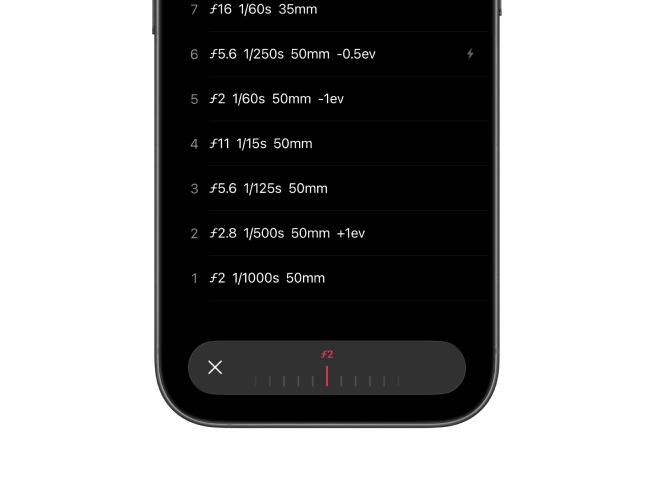
Added reset button in toolbar to quickly restore adjusted settings to their original values
The Mac app is now integrated into your iOS subscription, unifying the Frames ecosystem for easier access and management across devices.
Unified Pricing for the Frames Ecosystem
Based on feedback from the analog photography community, I've refined the pricing model. The Mac app no longer requires a separate subscription, it's now included with your iOS subscription at no extra cost. This unification makes it simpler to enjoy the complete Frames experience, from noting film details on iOS to integrating metadata into scanned images on Mac.
Sidebar Polish
The sidebar has been updated with improved colors that provide better contrast, making it easier to read and navigate your film metadata. Small change, but it makes a noticeable difference when you're working through your archive.
Improvements (3)
Mac app now included with iOS subscription at no extra cost
Improved sidebar colors for better contrast and readability
The recorder toolbar gets a significant update with a more practical layout that keeps all your essential controls visible and accessible. Combined with refined animations and better performance, recording your shots now feels faster and more responsive.
Always-Visible Toolbar Controls
For iOS 18 users, the recorder toolbar now displays all your essential controls at once, bringing it in line with the layout iOS 26 users have been enjoying since the previous update. Frame number, aperture, shutter speed, exposure compensation, and flash are always visible, no more scrolling to find what you need. A dedicated button gives you quick access to additional settings when needed, keeping the interface clean while ensuring everything is within reach.
Whether you're on iOS 18 or iOS 26, you'll notice improved animations and better performance throughout the toolbar. The result is a more practical, easier-to-use interface that gets out of your way when you're focused on shooting.
Refined Animations and Performance
The animations when adjusting settings are now smoother and more responsive. Transitions between controls feel snappier, and the overall experience is noticeably faster. These improvements make recording frames feel more fluid, whether you're quickly documenting settings or taking your time to dial in precise values.
Improvements (4)
Brought iOS 18 toolbar design in line with iOS 26 for a consistent experience
Improved animations when displaying and adjusting control values on both iOS 18 and iOS 26
Added icons to camera, lens, filter, and film stock labels for clearer identification
Reduced lag when switching between toolbar controls
Streamlined macOS experience with enhanced keyboard shortcuts, intelligent sidebar memory, and refined interface polish for a more efficient and productive metadata workflow.
Enhanced Keyboard Navigation
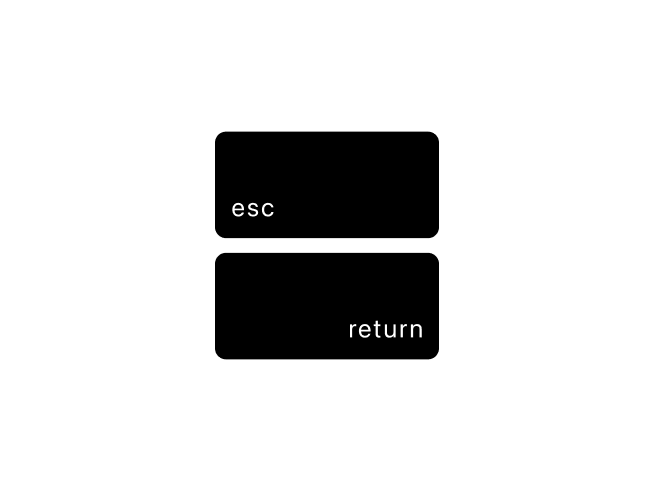
The ESC key now joins the existing keyboard shortcuts to make your workflow even more fluid. Press ESC to quickly deselect a frame and return to the film overview in the inspector, seamlessly switching between frame and film details without interrupting your focus. Combined with arrow key navigation, Return to attach images, and Delete to remove them, you now have complete keyboard control over your metadata workflow.
Smarter Sidebar & Refined Interface
The sidebar now intelligently remembers which sections you prefer expanded or collapsed—whether it's cameras, lenses, filters, film stocks, GPS coordinates, map, or image preview. Your workspace stays organized exactly the way you like it, saving time and reducing friction in your daily workflow.
The toolbar has been refined for macOS Tahoe with improved spacing that highlights the Export button, making it easier to locate at a glance. The enhanced visual hierarchy creates a cleaner, more professional appearance while maintaining the same familiar functionality. Plus, the app icon has been updated to match the iOS version for a unified experience across all your devices.
Improvements (4)
Added ESC key to deselect frames and switch between frame and film details
Sidebar sections (cameras, lenses, filters, film stocks, GPS, map, image preview) now remember their expanded/collapsed state
Enhanced toolbar spacing to highlight the Export button and improve visual hierarchy on macOS Tahoe
Updated app icon for consistent appearance with iOS app
Frames embraces Apple's modern design language with a comprehensive interface redesign featuring the new liquid glass design aesthetic. From a completely reimagined recorder toolbar to refined lists and controls throughout the app, every interaction now feels more fluid, polished, and purposeful.
A Modern, Fluid Interface
This update brings Apple's liquid glass design language to Frames, transforming the app's visual identity with subtle animations, refined spacing, and a more contemporary aesthetic. Toolbars and lists throughout the app now feature the characteristic smooth, flowing feel of modern iOS design, creating a more cohesive and polished experience that feels right at home on your device.
Redesigned Recorder Toolbar
The heart of this update is the completely reimagined recorder toolbar. What was once functional is now both beautiful and remarkably more convenient. Essential controls like frame number, aperture, shutter speed, exposure compensation, and flash now feature larger, more touchable buttons that are easier to read at a glance.
When you tap a setting, the toolbar elegantly morphs into a scroll picker with fluid animations that feel natural and refined. The interaction remains familiar but now with a modern polish that makes documenting your shots feel effortless and enjoyable. Additional settings remain easily accessible through the more button, keeping the interface clean while ensuring all tools are within reach.
Redesigned Controls: Larger, more legible buttons for frame number, aperture, shutter speed, exposure compensation, and flash settings.
Fluid Morphing Animation: Smooth, subtle transitions as the toolbar transforms into scroll pickers for precise value selection.
Enhanced Readability: Improved typography and spacing make values easier to read while shooting in the field.
Library Search
Finding specific rolls is now faster and more intuitive with the new search field in the Library. Available right from the first screen of the app, you can quickly locate any roll by name, making it effortless to navigate large collections or find that specific roll you're looking for.
Improvements (11)
Redesigned interface with Apple's liquid glass design language throughout toolbars and lists.
Completely reimagined recorder toolbar with larger, more accessible controls.
Implemented fluid morphing animations when transitioning to scroll pickers.
Enhanced button readability with improved typography and visual hierarchy.
Added search field to Library for quick film roll discovery.
Refined font sizes throughout the app for better consistency and readability.
Polished animations and transitions for a more refined, modern feel.
Redesigned the welcome screen for a cleaner look.
Added haptic feedback to recorder buttons.
Improved first column spacing in frames rows.
Enhanced folder search to include films from subfolders.
Fixes (4)
Scroll Picker: Resolved synchronization issues on iOS 18 where scroll picker values (aperture, shutter speed, frame number, exposure compensation) displayed incorrect positions after modifying settings through the detailed view.
Recorder: Optimized recorder performance for faster, more reliable logging.
Welcome Screen: Fixed translation issues for better localization.
Search Bar and Map View: Fixed glitches for smoother animations and consistent results.
Patches (4)
1.14.1:Recorder fixes and readability improvements